AI Bedroom Design — Your Dream Bedroom in 10 Seconds
Stop scrolling Pinterest for bedroom ideas. Upload your room photo and let Homelit's AI design it for you — free on iOS & Android.


Redesign Your Bedroom with AI
Your bedroom should be a sanctuary — but figuring out the right design can feel overwhelming. Homelit's AI bedroom design tool removes the guesswork. Upload a photo of your existing bedroom, choose a style, and see a photorealistic transformation in seconds. Try Scandinavian simplicity, cozy Farmhouse warmth, sleek Modern luxury, or romantic Boho layers — all without moving a single piece of furniture.
Whether you're planning a full bedroom renovation or just exploring ideas for a refresh, Homelit gives you a realistic visual to work with. Share it with your partner, send it to your contractor, or use it as a shopping reference to recreate the look in real life.
Before & After: AI Bedroom Redesign
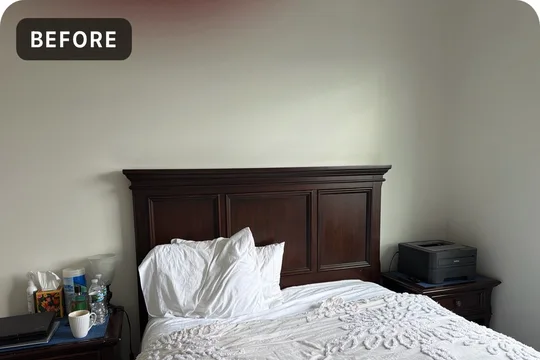
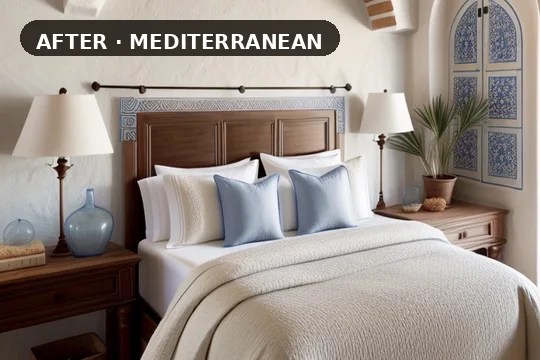
Bedroom Design Styles on Homelit
Homelit's AI supports all major bedroom design styles. A Modern bedroom features clean furniture lines, neutral color palettes, and minimal clutter — creating a calm, contemporary feel. Scandinavian bedroom design layers warm natural textures, light wood tones, and soft lighting for a hygge-inspired retreat. Farmhouse bedrooms bring shiplap walls, vintage nightstands, and warm linen bedding. Luxury bedroom design introduces rich textures like velvet headboards, marble accents, and statement lighting.
The Japandi style — a fusion of Japanese minimalism and Scandinavian coziness — has become one of the most requested bedroom styles on Homelit. It creates serene, clutter-free spaces with natural materials and earthy tones that feel both intentional and effortless.
Tips for Better AI Bedroom Redesigns
For the best AI bedroom design results, photograph your room from a corner angle to capture as much of the space as possible. Good natural lighting helps the AI understand your room's surfaces and textures accurately. You don't need a professionally staged room — Homelit works on lived-in, everyday spaces.
Once you find a bedroom design you love, save it to your library. Pro users can generate unlimited designs and compare multiple styles to find the perfect one. Download Homelit for free and start designing your dream bedroom tonight.
Frequently Asked Questions
- Can Homelit redesign a small bedroom?
- Yes — small bedrooms actually benefit most from AI design. Homelit helps you discover styles that maximize space, use lighter color palettes, and suggest better furniture arrangements.
- What bedroom styles can I try?
- Modern, Scandinavian, Farmhouse, Luxury, Boho, Japandi, Coastal, Industrial, and more. New styles are added regularly.
- Can I use my own bedroom photo?
- Yes — just upload any photo from your camera roll or take one in-app.
- How realistic are the AI bedroom designs?
- Very realistic. Homelit's ControlNet AI preserves your room's structure — ceiling height, window placement, floor type — while transforming the design elements.
Try Bedroom AI Redesign Free
Download Homelit and redesign your bedroom in seconds — no design skills needed.