AI Living Room Design — Reimagine Your Main Space
Your living room sets the tone for your entire home. Let Homelit's AI redesign it in any style — free on iOS & Android.


AI-Powered Living Room Design
The living room is the heart of the home — it's where you relax, entertain, and spend the most time. Getting the design right matters. Homelit's AI living room design tool lets you explore dozens of styles before committing to a single purchase. Upload a photo of your existing living room, choose a style, and see a photorealistic transformation in seconds.
From open-plan modern spaces to intimate, cozy farmhouse living rooms, Homelit's AI understands how to transform each unique space. The AI preserves your room's architecture — its proportions, windows, and natural light — while intelligently redesigning the furniture, textures, colors, and accessories to match your chosen aesthetic.
Before & After: AI Living Room Redesign
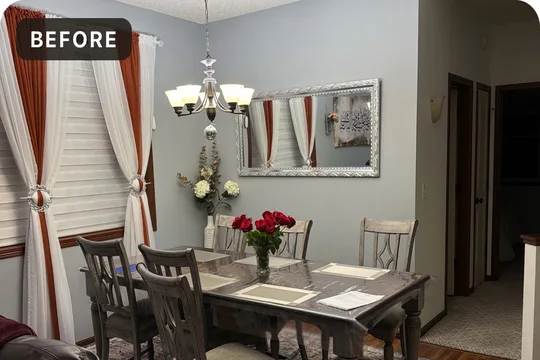
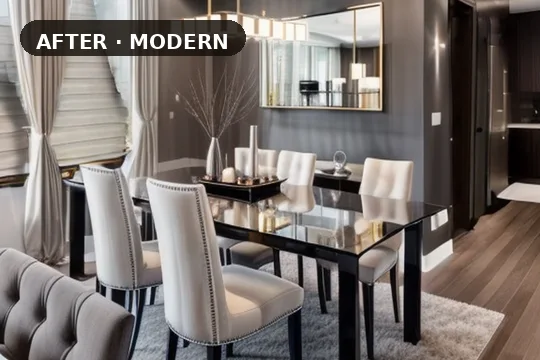
Living Room Design Styles in Homelit
Modern living room design brings a sense of calm through clean lines, neutral palettes, and intentional furniture placement. Scandinavian living rooms feel warm and inviting with light wood tones, chunky knit throws, and simple, functional furniture. Farmhouse style transforms living rooms with exposed beams, shiplap accents, vintage-inspired decor, and a warm, layered palette. Luxury living rooms make a bold statement with statement sofas, oversized art, dramatic lighting, and rich textiles.
Bohemian living rooms are one of Homelit's most popular styles — layering pattern-on-pattern, rich jewel tones, plants, and eclectic accessories to create spaces full of personality and warmth. Industrial living rooms use exposed brick, raw metals, leather, and dark tones for an urban, masculine aesthetic.
How to Get the Best Living Room AI Redesign
Photograph your living room from the main entrance or a corner to capture the most of the space. Include as much of the room as possible — the AI performs best when it can see the walls, flooring, ceiling, and main furniture arrangement. Good natural daylight produces the most accurate results.
Once your redesign is generated, you can try the same room in multiple styles back-to-back to compare. Pro users get 200 redesigns per month, making it easy to explore every style in your library. Start designing your living room for free today with Homelit.
Frequently Asked Questions
- Can AI design a living room realistically?
- Yes — Homelit's AI is trained specifically on interior design images and preserves your room's spatial structure while generating photorealistic style transformations.
- What if my living room is an open floor plan?
- Homelit handles open-plan spaces well. The AI reads the visible boundaries of the space and redesigns what it can see in the photo.
- Can I try multiple living room styles?
- Absolutely — you can run the same photo through as many styles as you like. Free users get 3 per month; Pro users up to 200.
- Does Homelit suggest furniture to buy?
- Currently Homelit generates visual designs. Shopping integration is on the roadmap for a future update.
Try Living Room AI Redesign Free
Download Homelit and redesign your living room in seconds — no design skills needed.