AI Room Redesign — Transform Any Space in 10 Seconds
Upload your room photo. Pick a style. Watch Homelit's AI completely reimagine your space — photorealistically, in seconds.


The Fastest Way to Redesign a Room
Traditional room redesign involves hours of browsing Pinterest, expensive consultations, and risky furniture purchases. AI room redesign with Homelit eliminates the guesswork. You upload a single photo of your existing room, and the AI generates a complete visual transformation — showing you exactly what the room could look like in your chosen style.
Homelit's AI understands spatial context. It doesn't just apply a filter — it intelligently replaces furniture, changes wall treatments, adjusts lighting, and selects complementary decor that fits the room's dimensions and layout. The result is a photorealistic room redesign that accurately reflects how the finished space would look.
Before & After: AI Room Redesign
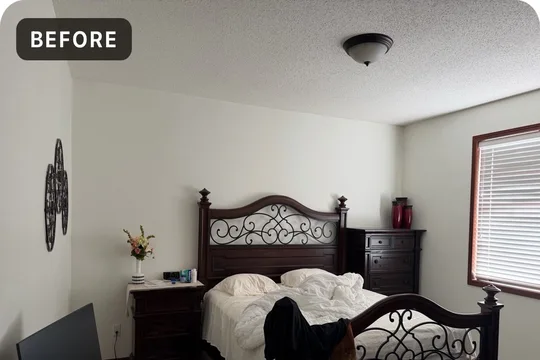
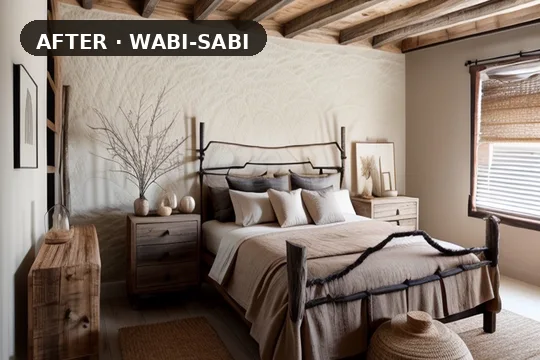
How AI Room Redesign Works
Homelit uses ControlNet-based AI technology trained on millions of interior design images. When you upload your room photo, the AI maps the structural elements of the space — walls, ceiling, floor, windows, and major furniture placements — and uses this spatial map to generate a new design that respects the room's actual architecture.
You can generate multiple redesigns of the same room in different styles and compare them side by side. Found a design you love? Save it to your library, share it with family members or your contractor, or use it as a shopping guide to recreate the look in real life.
Popular AI Room Redesign Styles
The most popular room redesign styles on Homelit include Modern (clean lines, monochromatic palettes), Scandinavian (light woods, hygge textures), Farmhouse (shiplap, vintage metals, warm tones), Luxury (velvet, marble, dramatic lighting), and Japandi (minimal, earthy, serene). Each style is carefully curated to produce stunning, coherent results.
Room redesign used to be a weekend project requiring massive effort. With Homelit, it takes 10 seconds. Try it free today — no design experience needed, no account required for your first redesign.
Frequently Asked Questions
- What makes Homelit different from other room redesign apps?
- Homelit uses ControlNet AI that preserves your room's spatial structure while transforming the design — not just a filter overlay. The results are photorealistic and respect your room's actual dimensions.
- Can I redesign a room multiple times?
- Yes — you can generate as many redesigns of the same room as you like. Free users get 3 per month; Pro users get up to 200.
- Does the AI redesign work on small rooms?
- Absolutely. Homelit works especially well for small spaces, helping you discover styles that maximize light and visual space.
- What photo quality do I need?
- Any photo from your iPhone camera works well. Better lighting produces better results, but the AI handles a wide range of photo conditions.
Try Room AI Redesign Free
Download Homelit and redesign your room in seconds — no design skills needed.